Friday, August 31, 2007
Useful Freeware
Here's a list of some new freeware that I found useful.
WinSplit Revolution
An intuitive, keyboard-based window arranging utility. Essential if you have a large widescreen monitor. (I just got a Dell 2407-HC at work!)
TeraCopy
A Windows file copying tool that supports pause-resume and error recovery.
doPDF
A PDF printer for Windows that doesn't depend on Ghostscript. A leaner (1.29MB only!) and faster replacement for PDFCreator.
ASAP Utilities
An Excel add-in that lets you do stuff like deselect cells from selection, apply formula to selected cells and a lot more.
Recuva
A tiny file unerase utility. Leave copy on a USB stick so you can run it without having to install. Link
WinSplit Revolution
An intuitive, keyboard-based window arranging utility. Essential if you have a large widescreen monitor. (I just got a Dell 2407-HC at work!)
TeraCopy
A Windows file copying tool that supports pause-resume and error recovery.
doPDF
A PDF printer for Windows that doesn't depend on Ghostscript. A leaner (1.29MB only!) and faster replacement for PDFCreator.
ASAP Utilities
An Excel add-in that lets you do stuff like deselect cells from selection, apply formula to selected cells and a lot more.
Recuva
A tiny file unerase utility. Leave copy on a USB stick so you can run it without having to install. Link

Sunday, June 18, 2006
Bend Word to Your Will
Everybody loves to hate Microsoft Word. That includes famous people like Dvorak, Slashdot folks, Kuro5hin folks and people who dislike WYSIWYG in general. Some of the criticism's that Word faces include:
The problem is that Word is designed to be easy if all you are interested in doing is writing a simple letter. To do anything more complicated you have to RTFM. Just like DocBook, just like LaTeX, just like all the supposed alternatives to Word. Of course, if you decide to learn Latex or DocBook, you have to read the manual, you won't be able to do anything at all if you don't. Word on the other hand seems to bring out I-don't-need-to-ask-for-directions behavior in people. Especially in highly technically savvy people. So if you're a geek or just someone who's lost a lot of hair over Word, here's what you should do:
First bookmark the Word MVP Site. You're going to need to look-up everything that's over there time and again.
Begin by reading the Tutorials and FAQs. Make sure you don't miss:
- Lack of separation of content from presentation
- Bloat and
- Clippy and all clippy-like behavior
The problem is that Word is designed to be easy if all you are interested in doing is writing a simple letter. To do anything more complicated you have to RTFM. Just like DocBook, just like LaTeX, just like all the supposed alternatives to Word. Of course, if you decide to learn Latex or DocBook, you have to read the manual, you won't be able to do anything at all if you don't. Word on the other hand seems to bring out I-don't-need-to-ask-for-directions behavior in people. Especially in highly technically savvy people. So if you're a geek or just someone who's lost a lot of hair over Word, here's what you should do:
First bookmark the Word MVP Site. You're going to need to look-up everything that's over there time and again.
Begin by reading the Tutorials and FAQs. Make sure you don't miss:
- Shauna Kelly's gentle introduction to Word,
- Using Outline View,
- Styles, which is a part of the larger Creating a Template and
- Working with sections
Labels: tips
LinkThursday, June 08, 2006
Making Explorer Do The Right Thing
Windows Explorer while usually well behaved, has some odd quirks which make things unnecessarily complicated.
For instance, unbelievable as this may seem, there's no way to sort files using extension. There is instead a generic "Type" which lumps all kinds of files together depending upon the application they are registered to.
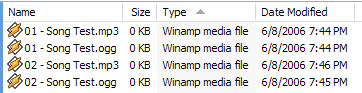
In the folder below, there seems to be no way of sorting to differentiate between the mp3 and ogg files.
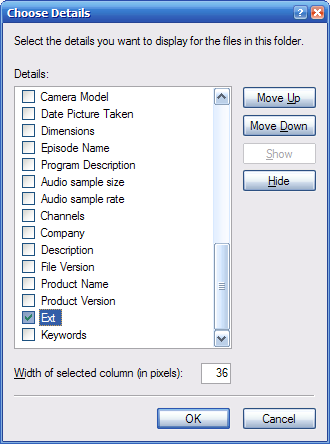
The solution is to install this Explorer extension. It neatly adds a "Ext" column. (In the Explorer menu, select "View -> Details" to popup the dialog below.)
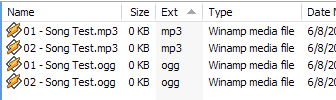
Now we can sort by extension, and all is well in the world!
This sort of thing also strengthens my theory that Microsoft is filled with excellent programmers (They designed a file browser so beautifully that you can write an extension for it with relative ease) but overeager user interface designers. This problem should never have happened in the first place. Link
For instance, unbelievable as this may seem, there's no way to sort files using extension. There is instead a generic "Type" which lumps all kinds of files together depending upon the application they are registered to.
In the folder below, there seems to be no way of sorting to differentiate between the mp3 and ogg files.
The solution is to install this Explorer extension. It neatly adds a "Ext" column. (In the Explorer menu, select "View -> Details" to popup the dialog below.)
Now we can sort by extension, and all is well in the world!
This sort of thing also strengthens my theory that Microsoft is filled with excellent programmers (They designed a file browser so beautifully that you can write an extension for it with relative ease) but overeager user interface designers. This problem should never have happened in the first place. Link